how to change '404 not found' page of your Blogger blog. ?
default 404 page of BLOGGER is not that well 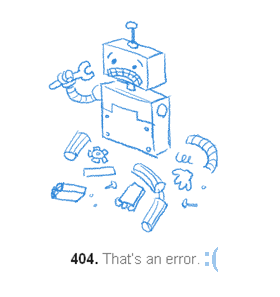 This will allow to keep visitors engage on your blog for little longer and decrease bounce rate.EXAMPLE
Here we go.1-go to Blogger Dashboard settings and then click on Search preferences2-click on Edit in front of custom page not found.3-now in this area Paste this whole thing.
<!-- MBW 404 Page --><div class='MBW-404-box'> <p style='line-height: 1.6em'><strong><font color='red' size='6'>Oops!!!</font> <font color='#666666'> <!-- http://www.mylatesttricks.com !-->Looks like you are trying to access page that does not exist or has been deleted. Please do any of the followings:</font></strong></p> <ol style='line-height: 25px'> <li><a href='javascript:history.go(-1)'>« Go Back</a> </li>
<li>Report the Problem By <a href='http://www.mylatesttricks.com'>Clicking Here</a>    (<i>This will help us serve you better</i>) </li>
<li>Go To Homepage by <a href='http://www.mylatesttricks.com/contact'>Clicking Here</a> <br/></li> </ol> <p><br><br></p><p align='center'><font color='#159b24' style='font-size: 135px'><strong>404</strong></font></p> <p align='center'><font size='5'>Error Page Not Found</font></p></div>
4- Replace first url in this ^ whole with your blog link
5-replace second url with your blog contact section or you facebook account url
6-save the changes.
7-click dashboard then template and then on edit html
8-click anywhere inside that big BOX containing your HTML
9-press CTRL+F collectively
10-find ]]></b:skin>
11-Paste this whole code under ]]></b:skin> .<b:if cond='data:blog.pageType == "error_page"'><style type='text/css'>.status-msg-wrap { font-size: 100%; margin: none; position: static; width: 100%;}.status-msg-border { display:none;}.status-msg-body { padding: none; position: static; text-align: inherit; width: 100%; z-index: auto;}.status-msg-wrap a { padding: none; text-decoration: inherit;}.MBW-404-box { background:#FFFFFF; width:96%; margin:10px 0px; padding:15px 15px; border:1px solid #b9b6b6; -moz-border-radius:10px; -webkit-border-radius:10px; border-radius:10px; box-shadow: 6px 6px 6px #e3e3e3;}</style></b:if>
12-save changings in template and you are done.
13-now check if it is working fine just open your website like
www.yourwebsite.com/lolololololol.so i have share about blogging IN SHA ALLAH in my next article i will sharing a article on TOP LATEST PASSWORDS CRACKERS | BREAKERS AND HACKING LATEST SOFTWARE FREE 2013s if you have any problem you feel free to ask us comment below Here we go.1-go to Blogger Dashboard settings and then click on Search preferences2-click on Edit in front of custom page not found.3-now in this area Paste this whole thing.
<!-- MBW 404 Page --><div class='MBW-404-box'> <p style='line-height: 1.6em'><strong><font color='red' size='6'>Oops!!!</font> <font color='#666666'> <!-- http://www.mylatesttricks.com !-->Looks like you are trying to access page that does not exist or has been deleted. Please do any of the followings:</font></strong></p> <ol style='line-height: 25px'> <li><a href='javascript:history.go(-1)'>« Go Back</a> </li>
<li>Report the Problem By <a href='http://www.mylatesttricks.com'>Clicking Here</a>    (<i>This will help us serve you better</i>) </li>
<li>Go To Homepage by <a href='http://www.mylatesttricks.com/contact'>Clicking Here</a> <br/></li> </ol> <p><br><br></p><p align='center'><font color='#159b24' style='font-size: 135px'><strong>404</strong></font></p> <p align='center'><font size='5'>Error Page Not Found</font></p></div>
4- Replace first url in this ^ whole with your blog link
5-replace second url with your blog contact section or you facebook account url
6-save the changes.
7-click dashboard then template and then on edit html
8-click anywhere inside that big BOX containing your HTML
9-press CTRL+F collectively
10-find ]]></b:skin>
11-Paste this whole code under ]]></b:skin> .<b:if cond='data:blog.pageType == "error_page"'><style type='text/css'>.status-msg-wrap { font-size: 100%; margin: none; position: static; width: 100%;}.status-msg-border { display:none;}.status-msg-body { padding: none; position: static; text-align: inherit; width: 100%; z-index: auto;}.status-msg-wrap a { padding: none; text-decoration: inherit;}.MBW-404-box { background:#FFFFFF; width:96%; margin:10px 0px; padding:15px 15px; border:1px solid #b9b6b6; -moz-border-radius:10px; -webkit-border-radius:10px; border-radius:10px; box-shadow: 6px 6px 6px #e3e3e3;}</style></b:if>
12-save changings in template and you are done.
13-now check if it is working fine just open your website like
www.yourwebsite.com/lolololololol.so i have share about blogging IN SHA ALLAH in my next article i will sharing a article on TOP LATEST PASSWORDS CRACKERS | BREAKERS AND HACKING LATEST SOFTWARE FREE 2013s if you have any problem you feel free to ask us comment below
<!-- MBW 404 Page --><div class='MBW-404-box'> <p style='line-height: 1.6em'><strong><font color='red' size='6'>Oops!!!</font> <font color='#666666'> <!-- http://www.mylatesttricks.com !-->Looks like you are trying to access page that does not exist or has been deleted. Please do any of the followings:</font></strong></p> <ol style='line-height: 25px'> <li><a href='javascript:history.go(-1)'>« Go Back</a> </li>
<li>Report the Problem By <a href='http://www.mylatesttricks.com'>Clicking Here</a>    (<i>This will help us serve you better</i>) </li>
<li>Go To Homepage by <a href='http://www.mylatesttricks.com/contact'>Clicking Here</a> <br/></li> </ol> <p><br><br></p><p align='center'><font color='#159b24' style='font-size: 135px'><strong>404</strong></font></p> <p align='center'><font size='5'>Error Page Not Found</font></p></div>
4- Replace first url in this ^ whole with your blog link
5-replace second url with your blog contact section or you facebook account url
6-save the changes.
7-click dashboard then template and then on edit html
8-click anywhere inside that big BOX containing your HTML
9-press CTRL+F collectively
10-find ]]></b:skin>
11-Paste this whole code under ]]></b:skin> .<b:if cond='data:blog.pageType == "error_page"'><style type='text/css'>.status-msg-wrap { font-size: 100%; margin: none; position: static; width: 100%;}.status-msg-border { display:none;}.status-msg-body { padding: none; position: static; text-align: inherit; width: 100%; z-index: auto;}.status-msg-wrap a { padding: none; text-decoration: inherit;}.MBW-404-box { background:#FFFFFF; width:96%; margin:10px 0px; padding:15px 15px; border:1px solid #b9b6b6; -moz-border-radius:10px; -webkit-border-radius:10px; border-radius:10px; box-shadow: 6px 6px 6px #e3e3e3;}</style></b:if>
12-save changings in template and you are done.
13-now check if it is working fine just open your website like
www.yourwebsite.com/lolololololol.so i have share about blogging IN SHA ALLAH in my next article i will sharing a article on TOP LATEST PASSWORDS CRACKERS | BREAKERS AND HACKING LATEST SOFTWARE FREE 2013s if you have any problem you feel free to ask us comment below <!-- MBW 404 Page --><div class='MBW-404-box'> <p style='line-height: 1.6em'><strong><font color='red' size='6'>Oops!!!</font> <font color='#666666'> <!-- http://www.mylatesttricks.com !-->Looks like you are trying to access page that does not exist or has been deleted. Please do any of the followings:</font></strong></p> <ol style='line-height: 25px'> <li><a href='javascript:history.go(-1)'>« Go Back</a> </li> <li>Report the Problem By <a href='http://www.mylatesttricks.com'>Clicking Here</a>    (<i>This will help us serve you better</i>) </li> <li>Go To Homepage by <a href='http://www.mylatesttricks.com/contact'>Clicking Here</a> <br/></li> </ol> <p><br><br></p><p align='center'><font color='#159b24' style='font-size: 135px'><strong>404</strong></font></p> <p align='center'><font size='5'>Error Page Not Found</font></p></div>
4- Replace first url in this ^ whole with your blog link
5-replace second url with your blog contact section or you facebook account url
6-save the changes.
7-click dashboard then template and then on edit html
8-click anywhere inside that big BOX containing your HTML
9-press CTRL+F collectively
10-find ]]></b:skin>
11-Paste this whole code under ]]></b:skin> .<b:if cond='data:blog.pageType == "error_page"'><style type='text/css'>.status-msg-wrap { font-size: 100%; margin: none; position: static; width: 100%;}.status-msg-border { display:none;}.status-msg-body { padding: none; position: static; text-align: inherit; width: 100%; z-index: auto;}.status-msg-wrap a { padding: none; text-decoration: inherit;}.MBW-404-box { background:#FFFFFF; width:96%; margin:10px 0px; padding:15px 15px; border:1px solid #b9b6b6; -moz-border-radius:10px; -webkit-border-radius:10px; border-radius:10px; box-shadow: 6px 6px 6px #e3e3e3;}</style></b:if>
12-save changings in template and you are done.
13-now check if it is working fine just open your website like
www.yourwebsite.com/lolololololol.so i have share about blogging IN SHA ALLAH in my next article i will sharing a article on TOP LATEST PASSWORDS CRACKERS | BREAKERS AND HACKING LATEST SOFTWARE FREE 2013s if you have any problem you feel free to ask us comment below
4- Replace first url in this ^ whole with your blog link
5-replace second url with your blog contact section or you facebook account url
6-save the changes.
7-click dashboard then template and then on edit html
8-click anywhere inside that big BOX containing your HTML
9-press CTRL+F collectively
10-find ]]></b:skin>
11-Paste this whole code under ]]></b:skin> .<b:if cond='data:blog.pageType == "error_page"'><style type='text/css'>.status-msg-wrap { font-size: 100%; margin: none; position: static; width: 100%;}.status-msg-border { display:none;}.status-msg-body { padding: none; position: static; text-align: inherit; width: 100%; z-index: auto;}.status-msg-wrap a { padding: none; text-decoration: inherit;}.MBW-404-box { background:#FFFFFF; width:96%; margin:10px 0px; padding:15px 15px; border:1px solid #b9b6b6; -moz-border-radius:10px; -webkit-border-radius:10px; border-radius:10px; box-shadow: 6px 6px 6px #e3e3e3;}</style></b:if>
12-save changings in template and you are done.
13-now check if it is working fine just open your website like
www.yourwebsite.com/lolololololol.so i have share about blogging IN SHA ALLAH in my next article i will sharing a article on TOP LATEST PASSWORDS CRACKERS | BREAKERS AND HACKING LATEST SOFTWARE FREE 2013s if you have any problem you feel free to ask us comment below 4- Replace first url in this ^ whole with your blog link5-replace second url with your blog contact section or you facebook account url6-save the changes.7-click dashboard then template and then on edit html8-click anywhere inside that big BOX containing your HTML 9-press CTRL+F collectively10-find ]]></b:skin>
11-Paste this whole code under 11-Paste this whole code under ]]></b:skin> .<b:if cond='data:blog.pageType == "error_page"'><style type='text/css'>.status-msg-wrap { font-size: 100%; margin: none; position: static; width: 100%;}.status-msg-border { display:none;}.status-msg-body { padding: none; position: static; text-align: inherit; width: 100%; z-index: auto;}.status-msg-wrap a { padding: none; text-decoration: inherit;}.MBW-404-box { background:#FFFFFF; width:96%; margin:10px 0px; padding:15px 15px; border:1px solid #b9b6b6; -moz-border-radius:10px; -webkit-border-radius:10px; border-radius:10px; box-shadow: 6px 6px 6px #e3e3e3;}</style></b:if>
12-save changings in template and you are done.
13-now check if it is working fine just open your website like
www.yourwebsite.com/lolololololol.so i have share about blogging IN SHA ALLAH in my next article i will sharing a article on TOP LATEST PASSWORDS CRACKERS | BREAKERS AND HACKING LATEST SOFTWARE FREE 2013s if you have any problem you feel free to ask us comment below
12-save changings in template and you are done.
13-now check if it is working fine just open your website like
www.yourwebsite.com/lolololololol.so i have share about blogging IN SHA ALLAH in my next article i will sharing a article on TOP LATEST PASSWORDS CRACKERS | BREAKERS AND HACKING LATEST SOFTWARE FREE 2013s if you have any problem you feel free to ask us comment below 12-save changings in template and you are done.13-now check if it is working fine just open your website likewww.yourwebsite.com/lolololololol.so i have share about blogging IN SHA ALLAH in my next article i will sharing a article on TOP LATEST PASSWORDS CRACKERS | BREAKERS AND HACKING LATEST SOFTWARE FREE 2013s if you have any problem you feel free to ask us comment below
How to start blogging Complete guideline in my previous article 404 Not found is the error which occurs when you try to visit page which does not occur


