Pages

Showing posts with label TiPS. Show all posts

Saturday, 15 June 2013

Hot Top 10 Programs for Windows

Hot Top 10 Programs for Windows 

Here you can read about 10 must-have apps for Windows XP.
This link will lead you to the list of necessary applications for Windows 7.
And this article is about Windows 8 must-have software.
Recently, a new feature has been added to Software Informer. Now, every registered user has an additional tab that lists recommended software. While how the list is compiled is a big secret, there are some things I can tell you about it. For instance, the more friends you make on Software Informer, the more interesting the list becomes. Please do not presuppose that the list is compiled from the most popular programs used by your friends, that is not entirely true. There are some sophisticated algorithms at work, which make sure the displayed entries are as diverse and as interesting as they can get. The truth is, the algorithm just works better when the sample is big enough - that is, you have a lot of friends. I've watched the development process closely and I can tell you that the programmers have put all of their hearts into this exciting new feature.
I encourage you to go to your profile page and check out the recommendations made for you. I am sure you will find something interesting in there. Meanwhile, over here, I will go on and share my top 10 Windows programs to have. The following list is made up of the programs I install as soon as I get Windows up and running. This list will work well for both Windows XP and Windows 7. I consider Windows Vista as a subset of Windows 7, though it came earlier than Windows 7; the point is, it is highly probable that you can run all of those programs in Vista as well.
Hot Top 10 for WindowsHot Top 10 for Windows
Total Commander is the very first application that gets on my hard drive. It makes browsing through files so much simpler! There are two panes that help you copy and move files and entire folders in just two key strokes. Let me tell you – the same task is much more complicated when you use the mouse or touch-screen inputs. The program allows me to navigate through my drives and files on them in a blink of an eye. I use the program to copy, cut, move, rename, and delete. And you would not believe how much of that I do daily. Besides, it is one of the most popular file managing programs on the market and there are a lot of plug-ins available to further extend its rich feature set.
Total Commander Main WindowTotal Commander Main Window
AVG. The security and the integrity of the system justify the value of your computer. A virus-ridden system does not provide any value, as any input or output can be easily compromised. I used to be a hardcore Norton Antivirus fan, but there is a new sheriff in town – AVG. AVG Antivirus and Firewall does its job quite well. And best of all, it is free. The professional version unlocks a lot more features, but I rarely need them and I am fine seeing ads just to keep my computer's protection absolutely free to me.
AVG Anti-Virus FreeAVG Anti-Virus Free
J.R. Media Player + iTunes are the two players you will need if you own an iDevice. J.R. Media Player is one of the best media managers I have ever used. In fact, I do not even pretend looking for a replacement anymore, I just know all of the alternatives will fail in comparison. It has a very confusing at first, but extremely convenient in the long run, interface. iTunes does not let you change as much in its interface, but you need it to sync your media library with your iDevice. J.R. Media Player can do it too, but you would not want to trust any 3rd parties with syncing your precious Apple product. J.R. Media Player is used to correct information in my MP3 files: their album art, rename the files according to the rules I specify, truncate silence at the beginning and at the end of the tracks, convert files into MP3, analyze and do many other things that make sure my music and video library is perfectly organized.
J. River Media CenterJ. River Media Center
iTunes Media CenteriTunes Media Center
WinRar or WinZip. Files with RAR and ZIP extensions were a common occurrence when the Internet was slow. Nowadays, those compressed archive files are replaced with download managers that support resuming and sectioning (breaking up a file into many small peaces and downloading 2-3 concurrently). At any rate, they are not completely gone yet, and you will need one of them (more likely WinRar, as it can handle ZIP files, while ZIP cannot handle RAR files) on your system just in case. On the other hand, I take it back. Total Commander can handle RAR and ZIP files right from the box, so if you have it installed, you may skip getting either of these two programs.
WinRar Main WindowWinRar Main Window
WinZipWinZip
Adobe Reader. I do not have to tell you how important this package is. There are tons of documents online that are in PDF format. And sooner or later you will be asked to follow Adobe's website so you can download their Reader. Hence, do it as soon as you can – it is a large file and it will take you some time to download.
Adobe Reader LauncherAdobe Reader Launcher
Cyberlink's Power2Go. There is a great article about Cyberlink's product that you should check out. Power2Go is what I trust to burn my CDs or DVDs, and soon BD Disks. I am yet to have one failed disk with Power2Go.
Power2Go 7 LauncherPower2Go 7 Launcher
VNC. I know a thing or two about networking and can configure my router to let the outside traffic into my home network. Hence anywhere in the world I can access my computer at home as long as I remember its IP address and it hasn't done some Windows update that turned my computer off. VNC directly connects to your computer's desktop, so it is like you are at your computer, but in a remote location. In case you cannot figure out your router, there are web services that create a secured Internet tunnel between your computer and their website. With them, you can easily access your desktop without much configuration, but you will have to pay for this with your hard earned money.
VNC Connected to Windows VistaVNC Connected to Windows Vista
Media Codecs. I have a lot of friends and once in a while they are sending me awesome clips (clips they wouldn't dare to post on YouTube). I like watching them, but the problem is that my friends use different odd codecs for encoding their videos. It used to be a headache, until I came across k-Lite codec packs. With it, almost every single file that I throw at it will play. So if you are downloading a lot of movies off the Internet, then this is the package to have. Just remember to not store the downloaded package on your computer – it is better to download it over and over again because the contents are changing to keep up with the development of new codes.
uTorrent. The modern Internet is ruled by peer-to-peer networks. uTorrent is a lightweight and simply the best client to use. Its latest interface is just amazing and the program works extremely well. If you are planning on download torrent files, I would recommend this program.
uTorrent Main WindowuTorrent Main Window
Software Informer client. To tell you the truth, I like being informed about new versions of the software installed on my computer, and I like Software Informer client for making this process absolutely automatic. The newer versions of programs may fix some bugs or add functionality that I was longing for in some of the programs. So this is a really great tool to have in your software vault...
Software Informer ClientSoftware Informer Client
This was the list of top 10 packages for Windows. Since I also use Linux and Mac OS X, I will tell you about top 10 packages for those operating systems as well in my future articles. Until then, please explore your recommendations in your profiles. And be with Software Informer and stay updated!

Wednesday, 12 June 2013

HOW TO MAKE WINDOW 8 IS GENUINE FREE LATEST 2013 100% WORKING


in my previous article  I was explained that how to make so now finally after the some request of my friend’s and the Reader so then finally I will try to explain thathow to make window 8  Free easily. 
  
Everybody is a talking about the Microsoft's latest operating system that is Windows 8. It is seen as new and best ever operating system with the best design and the clean interface. Everybody wants to try get and their hands on it, and it’s very difficult for everyone to access it. but if you are interested to get it so then you have bought Windows 8 easily with the help of just simple trick. The first thing that you will do after the installing it is activates and it with your Genuine Windows 8 the new product keys.

  1. how to make window genuine free la


The procedure of the activating your Windows 8 is a very simple n easy and is the exactly similar to the Window 7 Windows 8 the activation procedure. So all you need to do is to a provide Windows 8 Genuine new product keys to a activating application and for activating your Windows 8 Genuine. You just simple run below software first download it install it.it very easy so lets start

For Software . Comment Below your Email.

update : 

                                               DOWNLOAD


STEP#01:og
Run the software 

windows 8 hack activation

 STEP#02:
Then after its completed its show's like below .so then click on the windows 8 install.

How to Make Window 8 is Genuine Free Latest 2013 100% working

 STEP#03:

after that just give the n for make window 8 Genuine Free like below

How to Make Window 8 is Genuine Free Latest

It’s very easy trust me 100% working .you can see below my window 8 was activated.

How to Make Window 8 is Genuine Free

Warning:
It’s a illegal Work to make Window Genuine. so try to use on your Risk.

Sunday, 2 June 2013

IRCTC ticket booking trick Populate passenger names using Travel and Master Lists in IRCTC to book tickets fast and easy


IRCTC have the facility to Populate passenger name using Travel and Master Lists.
Suppose you travel as a group often (say family or friends) to specific places, saving a travel  list is going to be your quick solution. Just create a new travel list and add all your co-passengers to the list.

Creating Passenger Travel Lists
For convenience of easy inputting of Passenger particulars during booking of tickets, you can create/modify various combinations of Travel Lists of Passengers for different tickets/journeys from your Master List of Passengers.


Master List of Passengers
You can create a master list of all passengers who are likely to travel on the tickets booked by you, so that while booking tickets you can easily input data from this list. Please click on "Add Names" and enter the details of possible passengers in the format given.

Note: You can add any number of passengers in this master list; however, as per Railway rules, a maximum of only 6 names can be included in any one Passenger Travel List for a specific journey.

You can also Add/Modify the details in the reservation form Or, if you have some passengers in the Master passenger list and prefer to add them here, that’s also possible.

IRCTC Magic Autofill Form Indian Railways Magic Auto FillForm How To Get Tickets Quickly in IRCTC


It is really hard to book Tatkal Tickets, either from online or from ticket counters at Railway Stations. When the booking starts (10 AM IST) the site irctc.co.in frequently shows server errors due to high load. In result we failed to book tickets online, you know the importance of time especially when you are planning to make a train reservation under the Tatkal scheme.
That’s where Magic Autofill can help. It’s a simple online tool that will fill the passenger details form on the IRCTC website with the click of a button thus giving you an upper hand.

Go To Magic AutoFill

In this tutorial about “How to quickly book Tatkal Ticket online from IRCTC. Follow the entire tutorial perfectly to book IRCTC Online Railway Reservation in both General and Tatkal Schemes.

IRCTC Magic AutoFill Form

1. Open IRCTC Magic AutoFill Form for Indian Railways at http://ctrlq.org/irctc
2. Fill all the details correctly which are same as in IRCTC Website.
3. Now Press “I’m Feeling Lucky” that freezes all the entered data.
4. After then, find “Magic AutoFill” button and drag it to Bookmarking Toolbar of a Browser.
5. Completing all the above steps, logon to IRCTC Booking Train Tickets Website at www.irctc.co.in.
6. Enter the Source, Destination and select Tatkal type then hit Find Trains.
7. Select the appropriate train and move for booking train tickets in Tatkal Scheme.
8. Here IRCTC Magic AutoFill Form plays its role by single click. It fills all the fields which you have to enter manually. It saves your time and increases chances of getting IRCTC Tatkal Ticket.
9. Continue still the Ticket Confirms.

Hope this IRCTC Booking Train Tickets Trick works for you for Online Railway Reservation. Share if you like.

Converting Torrent File To IDM


Torrent is the big server for downloading files like Games,Videos,Movies and other big files.But the torrent speed is depend upon the peers,leeches,speeders and many others.
Here we guide about the new Trick 'How To Download Torrent Files Using IDM'.

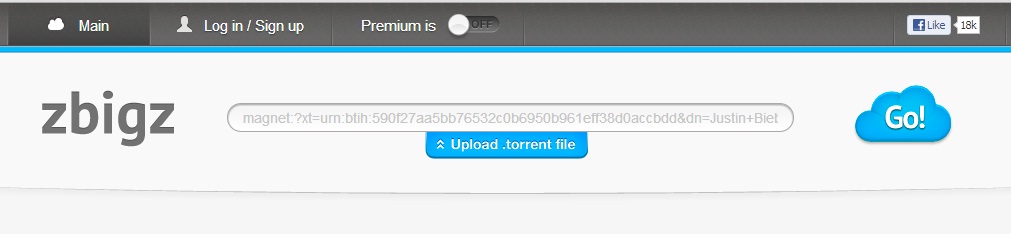
Zbigz.com lets you download files stored in the BitTorrent network using the Zbigz.com servers – the servers act as a proxy for you. This means that no BitTorrent peers or files are controlled by Zbigz.com

Advantage Of Download Torrent File With IDM

  • Internet Download Manager(IDM) is the best download manager and use the maximum speeds of your internet.
  • Internet download manager speed doesn't depend on seeders,leeches.
  • Downloading Torrent Files With IDM is really useful when you are downloading files with less seeds.

Steps To Download Torrent Files using IDM:
1.First go to Zbigz.com.
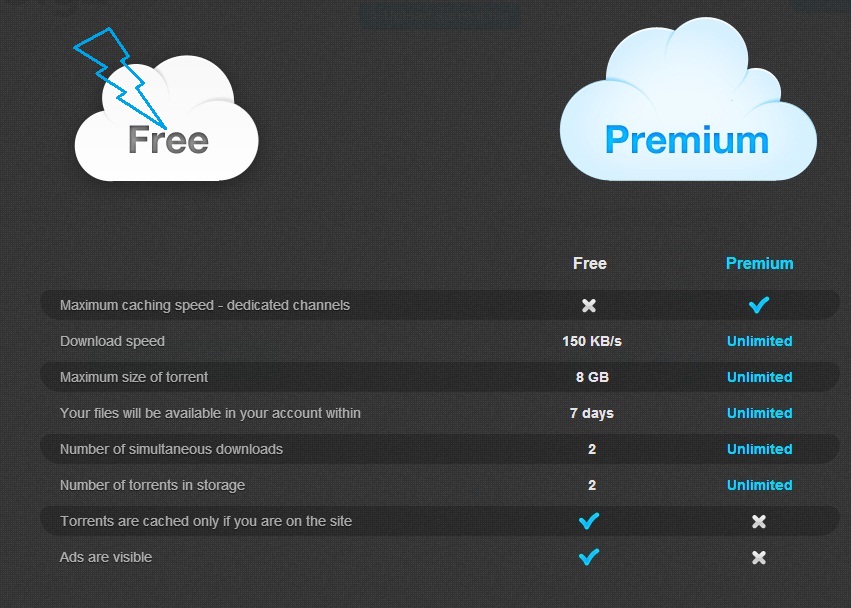
2.Signup for a free account there.
3.After the finished signup process go to your torrent search engine and search for the file which you want to download with idm.


7.Then pop-up window will be appear pop up asking for premium or free download.Choose Free Download.


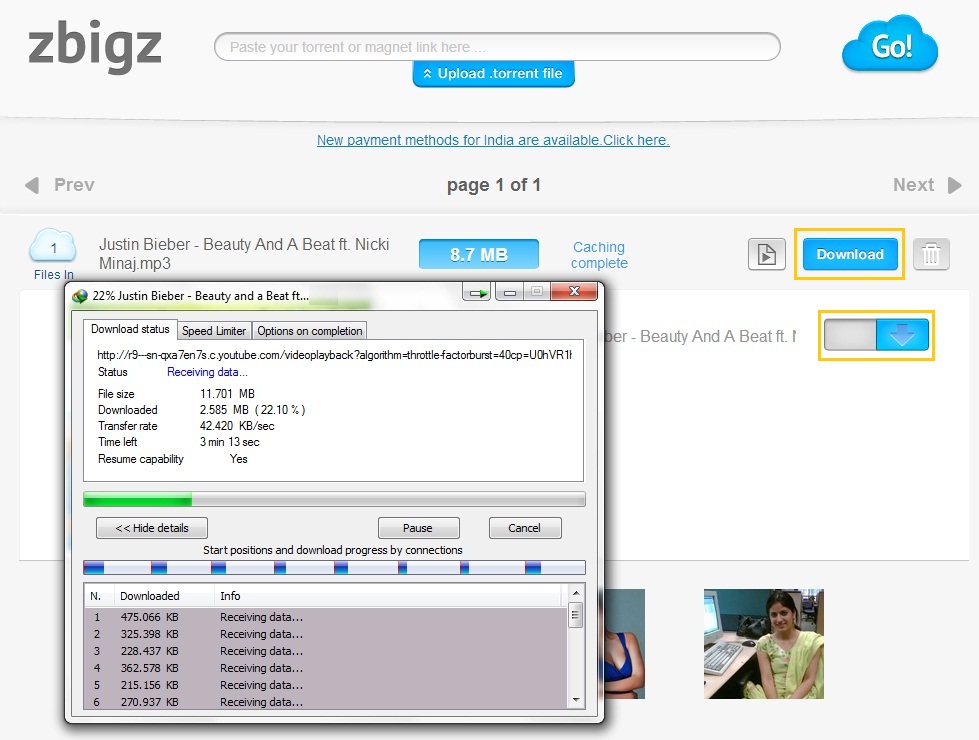
8.After choosing free your torrent file will be downloaded by high speed servers and your file will be ready to download(If its a large file then wait for few minutes).

9.When you hit download button then a box will pop up asking the type of download which you want either free or premium.Go for free download.

10.That's it your download will be ready and you can download torrent files with idm.

Note: Sometimes file is not caching properly by zbigz, so don't worry just try again and use this trick for fast downloading torrent file using IDM... Thanks!!

Saturday, 25 May 2013

CD-ROM Cleaning Tips

If your CD drive creating problem to read CD disc, taking time to read  and showing message there is no disc in the drive. These are the symptoms of dirty or weak CD-drive lens, because dirty lens can create errors in reading or writing and soon will not work at all.
Follow the given steps to care and clean a CD-Drive.
  • First make sure your discs are clean, unscratched and you’re loaded it properly.
  • Always use laser lens cleaner to clean drive lens.
  • Insert the laser lens cleaner disc and play it for 2 to 3 min.
  • Using CD drive cleaner properly clean the CD-ROM laser from dust.  If your drive still creating problem then open it and clean the lens with a cotton swab.

How to clean CD/DVD with care?

You can preserve the life of CD/DVD, if you handle and clean it properly, because dirty discs can create errors in reading or writing and soon discs will not work at all.
Follow the given steps to care and clean a CD/DVD.
  • Avoid to touching the writeable or data side of the CD/DVD.
  • Always hold your CD/DVD by its center hole or by the outer edges.
  • Keep away your discs from sunlight, heat and anything that may create scratch on the discs.
  • Always clean dust with a soft cloth or with a CD/DVD cleaning kit and avoid to clean with static cloth or harsh detergents.
  • Start work to clean from inside to outside in straight lines until the CD/DVD is clean.
  • Store your all discs vertically position and in dust free box.

twitter account hack

Good Morning to all. previously i have posted Free Download twitter Phishing page . today in this article i am going to  show you how to hack twitter account password using phishing page. i think now i am sure you know what is phishing and why it's  used for . so guys now follow the given below steps for do this.


1. First of all download Twitter Phisher

2. The Download File Contains
 
 twitter.html
  log.txt
  mail.php


3. Now you upload all of the files in any free webhosting website .


  www.yourfreehosting.net
  www.esmartstart.com
  wwww.100mb.com
  www.ripway.com
  www.t35.com

4. Once you have uploaded the files in the directory and send this phisher link (Twitter.html) to your victim and make him login to his twitter account using your sent phisher.

5.When he logs in to his twitter account using phisher , all his typed twitter username or email and password in stored in "log.txt"


6. Now you open log.txt to get hacked twitter id and password 

That's it . it's very simple method . now you have your victim's twitter id and password hacked


If any one don't know how it works ?


When a user type a username password in the text box , the info is sent to "login.php" which acts as a password logger and redirects the page to "Loginframe2.htm" which shows there has been a temporary error please try again in it . so when the person clicks on try again it redirects to the actual URL So that the victim does not know that yoursite is a fake site and gets his twitter.com password hacked.

window 7 product key.


Find your window 7 product key follow these steps:
1):enter cd into cd-rom
2): right click on cd and then click on search option.
3):write "product" and search now
4):open product file and note now product key.


How to Remove Genuine Notification on Windows XP.s

1. Lauch Windows Task Manager.
2. End wgatray.exe process in Task Manager.
3. Restart Windows XP in Safe Mode.
4. Delete WgaTray.exe from c:\Windows\System32.
5. Delete WgaTray.exe from c:\Windows\System32\dllcache.
6. Lauch RegEdit.
7. Browse to the following location:
    HKEY_LOCAL_MACHINE\SOFTWARE\Microsoft\
    Windows NT\CurrentVersion\Winlogon\Notify
8. Delete the folder ‘WgaLogon’ and all its contents
9. Reboot Windows XP.

OR

1.copy the files in "system32" that included with this file to your \windows\system32 folder.
2.Now click ---> start ----> run and type "instexnt install" .

3.From Now To Forever Your Windows Xp Copy Will Be Genuine .

4.restart your computer or add the registry file "1.reg" to your registry .

** You can use the file "Wga.exe" to clear Microsoft Notifications.

How to Make an Auto-Hacking USB Drives

I will teach you how to make a basic Auto-Hacking USB Drive. There are probably many different variationsof this. I will be showing you the most basic.

You need two things:
1) A USB Drive devoted to this
2) The programs and files that I will show you how to make or where to get. If you have trouble making the two files that I show you how to create, they can be downloaded at the end.

How to Make an Auto-Hacking USB Drive - Welcome to Naveen Ethical Hacking

Step 1: A Brief Explanation


OK. If you are looking for an Instructable that will teach you how to hack the Pentagon with a 2GB USB Drive, look somewhere else. This trick uses a batch file, an auto run file, and downloaded programs.

How to Make an Auto-Hacking USB Drive - Welcome to Naveen Ethical Hacking

Step 2: The Autorun File

So. Here we go. We will start with the Autorun file.

This file is the one that makes the pop-up window when you plug in the USB Drive. You can use this on any USB Drive, even if it has U3 on it.

Open Notepad (I'm using Notepad++) and type the following:

(autorun)
label=(Name you want the drive to have)
icon=(Icon file).ico
open=(Batch file we will make later).bat
action=(What you want the action to be)

MAKE SURE YOU DO NOT TYPE THE ()'s! Where it says (autorun), replace the parentheses with brackets (the buttons to the right of the "p" key on the keyboard. USE THE BOTTOM BRACKETS, NOT THE TWISTY FRENCH BRACKETS!)

Save this file as Autorun.inf

Make sure that you save it immediately inside your USB Drive, not inside any sub-folders (My Computer, Autohax0r).

Also, I have used an icon (an .ico file), so the USB Drive will have a different picture than the boring standard picture. To get one of these, I advise going to http://www.iconarchive.com/ to get an .ico file (you have to specifically download it as .ico). If you do this, save the icon in the same place as the Autorun file.

How to Make an Auto-Hacking USB Drive - Welcome to Naveen Ethical Hacking How to Make an Auto-Hacking USB Drive - Welcome to Naveen Ethical Hacking

How to Make an Auto-Hacking USB Drive - Welcome to Naveen Ethical Hacking


Step 3: The Batch File

We will now make the batch file that starts all the "hacking programs." MAKE SURE YOU NAME IT THE SAME AS WHAT YOU CALLED IT IN THE AUTORUN FILE!

Type this into Notepad:

@echo off
title KTX
start .\Applications\FOLDER\APPLICATION.exe
start .\CommandLine\Process.exe -k TermX.exe
start .\CommandLine\Process.exe -k WinVNC.exe
pause
goto eof

I will explain the commands used:
@echo off: Makes it so the file pops-up without showing the commands. Makes it look more professional.

title: Makes a title at the top of the batch file.

start: If you can't figure this one out, you should not be reading this Instructable.

pause: Pauses the file, waits for you to press any button.

goto: Sends the file to a different part of the script.

eof: End of file.

Also, TermX.exe is a program that my school uses to keep us out of certain websites. IT IS NOT THE FIREWALL. For info on WinVNC.exe, go to http://www.processlibrary.com/directory/files/winvnc.

Where it says \FOLDER\APPLICATION, you will change this in two steps.

Save this as KTX.bat, and place it in the same place (directory) as the Autorun.inf file.

How to Make an Auto-Hacking USB Drive - Welcome to Naveen Ethical Hacking How to Make an Auto-Hacking USB Drive - Welcome to Naveen Ethical Hacking

How to Make an Auto-Hacking USB Drive - Welcome to Naveen Ethical Hacking

Step 4: The "Hacking" Programs

Ok. We are now going on to the actual hacking programs. Go to http://www.nirsoft.net/, and browse the programs. If you have any different websites or programs, feel free to use them. I am using SniffPass, LSASecretsView, and WirelessKeyView. Install them, and place them and the folders they create in the same directory as all the other stuff.

Your computer might identify some as viruses, but don't worry. It only does this because some programs can find certain passwords.

Also, you might notice that I have a folder called "CommandLine." This is a VERY usefull program, and can be downloaded at http://www.beyondlogic.org/solutions/processutil/processutil.htm. There is also a hearty description at this page.

Step 5: Modifying KTX.bat


It is now time to go back to KTX.bat (by the way, remember that TermX.exe thing I mentioned? Well, KTX stands for "Kill TermX". Feel free to change the batch file name to whatever you want, just MAKE SURE TO ADJUST THE AUTORUN FILE, TOO!).

Go to the part of the Autorun file where it says "start .\Applications\FOLDER\APPLICATION.exe". You are going to change this. Also, add or subtract as many of this line as you need. If you have three programs to run, you need three lines of this code.

First, create a folder in the same place as the Autorun and KTX files, and name it Applications. Drag all the folders that contain the hacking programs into the Applications folder. You should come up with a directory like this:
"My Computer\AutoHax0r\Applications\HACKING FOLDERS HERE (with programs inside the folders)"

Also, you do not have to have the CommandLine in the KTX file. 

How to Make an Auto-Hacking USB Drive - Welcome to Naveen Ethical Hacking

How to Make an Auto-Hacking USB Drive - Welcome to Naveen Ethical Hacking

Step 6: All Finished!


Ok. This is the end of the tutorial. You should have the Autorun.inf file, the KTX.bat file, and some hacking files of your choice. To work the magic of the Auto-Hacking USB Drive, just unplug the dive in question and plug it back in. If it doesn't work, you did something wrong, because I told you how to do it right. Either that, or you have strange computer settings.

If you are confused as to how to make the batch file or the Autorun file, download them here.

How to Make an Auto-Hacking USB Drive - Welcome to Naveen Ethical Hacking How to Make an Auto-Hacking USB Drive - Welcome to Naveen Ethical Hacking

Click here To download the two files
 

Sample text

Sample Text